VS Code Extension
The Sidekick Docker extension embeds the Docker dashboard as a webview panel inside your editor. Works with VS Code, VSCodium, and compatible editors.
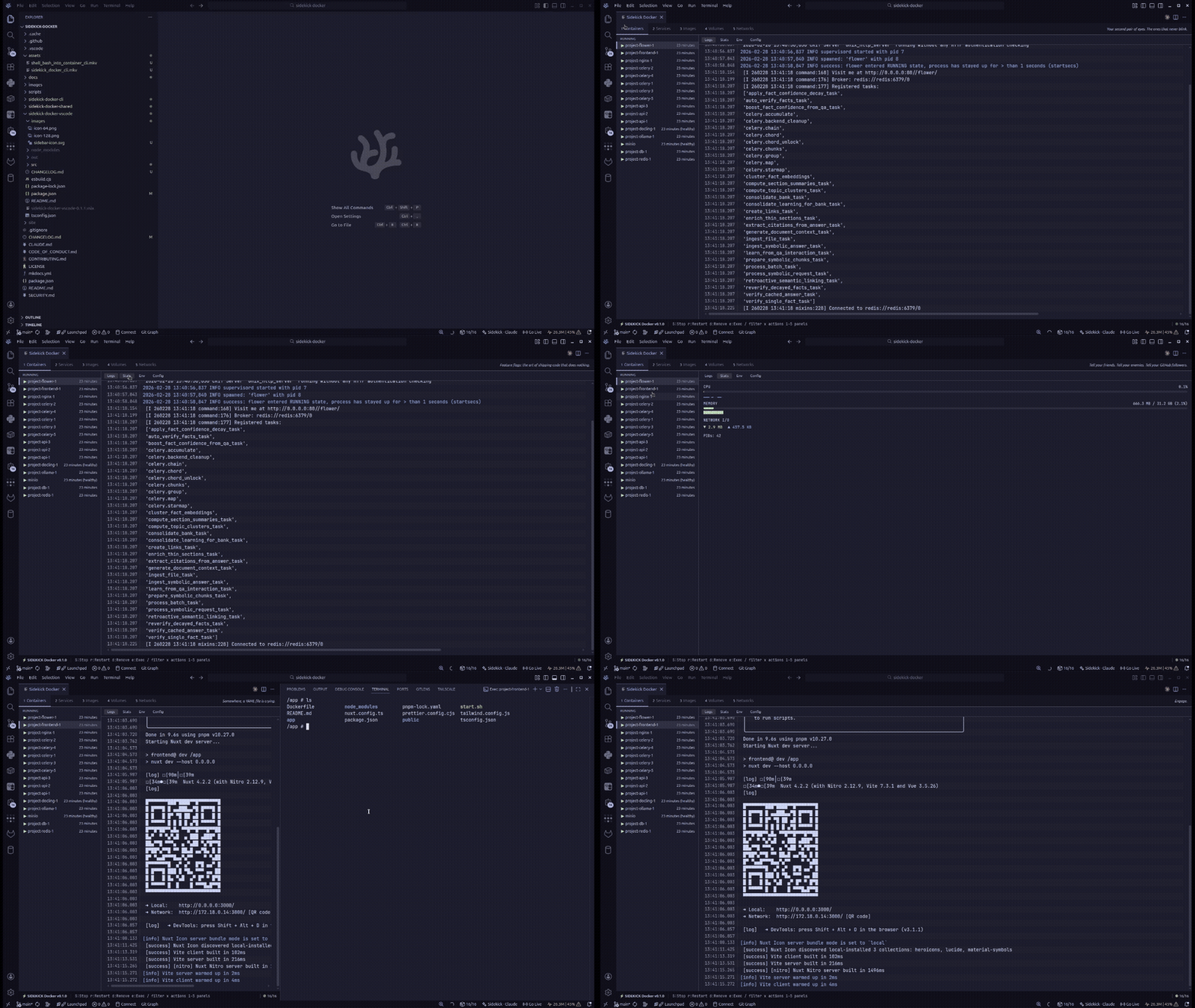
Installation
Install from Open VSX (recommended for VSCodium and compatible editors) or the VS Code Marketplace. You can also search for Sidekick Docker in the Extensions view.
Opening the Dashboard
Open the command palette (Ctrl+Shift+P / Cmd+Shift+P) and run:
or press Ctrl+Alt+D — Ctrl, not Cmd, on macOS too (macOS reserves Cmd+Opt+D for the Dock). The dashboard opens as a webview panel with the same layout as the terminal TUI. The dashboard panel survives window reloads.
Commands
| Command | Description |
|---|---|
Sidekick Docker: Open Dashboard |
Open the dashboard (Ctrl+Alt+D, all platforms) |
Sidekick Docker: Open Dashboard to the Side |
Open in a split editor column |
Sidekick Docker: Refresh Containers |
Refresh the tree view (Ctrl+Alt+R / Cmd+Alt+R when the Containers view is focused) |
Sidekick Docker: Start/Stop/Restart Container... |
Quick-pick a container to act on |
Sidekick Docker: Exec into Container... |
Quick-pick a running container and open a terminal inside it, using sidekick-docker.exec.defaultShell |
Sidekick Docker: Show Container Logs... |
Quick-pick a container and open a terminal running docker logs -f --tail 200 for it |
The tree view adds Open in Dashboard for containers and Compose Up / Compose Restart / Compose Down for Compose project groups; those appear only in its context menu, not in the command palette.
Containers Tree View
The activity-bar Containers view groups containers by state (and by Compose project). A container's context menu offers the actions that apply to its state — start, stop, restart, pause/unpause, remove (stopped containers; asks first), Exec, Show Logs and Open in Dashboard — and running-but-unhealthy containers are marked as such.
Right-click a Compose project group for Compose Up, and for a running project Compose Restart and Compose Down (Down asks for confirmation). They run docker compose with the project's recorded files, against the same endpoint as the rest of the extension. Compose actions are hidden, and refused, in an untrusted workspace, because running them would execute the workspace's compose file.
While the first connection is in progress the view says Connecting to Docker…. When the daemon is unreachable, the view shows why (permission denied on the socket, socket not found, connection refused, host unreachable…) and offers a Retry Connection action.
The status-bar item shows running/total counts, plus a warning count of unhealthy containers, and opens the dashboard on click. Its tooltip names the endpoint (or, when offline, the reason), and it carries an accessibility label for screen readers.
Settings
| Setting | Default | Description |
|---|---|---|
sidekick-docker.socketPath |
"" |
Docker endpoint: socket path, unix://, or tcp://host[:port]. Empty uses the platform default (or DOCKER_HOST). |
sidekick-docker.refreshIntervalSeconds |
30 |
Fallback full-refresh interval in seconds (minimum 5). |
sidekick-docker.statusBar.visible |
true |
Show the status-bar container counts. |
sidekick-docker.exec.defaultShell |
/bin/sh |
Shell used when opening an exec terminal into a container. |
Settings apply immediately — the extension reconnects without a window reload.
Restricted Mode
In an untrusted workspace (Restricted Mode), sidekick-docker.socketPath and sidekick-docker.exec.defaultShell are read from your user settings only — VS Code ignores the workspace's values, so a cloned repository's .vscode/settings.json cannot point the extension at another daemon or shell. Compose is disabled there too. Granting trust re-reads the settings and reconnects both the tree view and the dashboard.
Features
- Full Docker dashboard — containers, Compose, images, volumes, networks
- Real-time updates — logs and stats stream live inside the editor
- Smart log highlighting — token-level syntax coloring for HTTP methods, status codes, URLs, IPs, timestamps, JSON keys, and more
- Log search & filter — search within log output with exact or fuzzy matching and match highlighting
- Log analytics — severity count badges and pattern clustering that groups similar logs into templates
- Container management — start, stop, restart, pause, unpause, remove directly; only actions valid for the container's state are offered, and prune/remove confirmations name what they remove
- Health status — shows healthy/unhealthy/starting indicators for containers with health checks
- Config tab — health failing streak and last probe output, exit code with OOM/daemon error, restart policy and restart count, and mounts
- Open in Browser — press
bon a running container with a published port; with several ports a quick pick asks which. URLs go throughasExternalUri, so they work over Remote-SSH, WSL and Codespaces port forwarding - Sort direction in words — the sort menu, toasts and status bar say "A→Z", "highest first" or "running first" rather than ascending/descending
- Compose support — detect and manage projects
- Stats monitoring — live CPU, memory, network I/O, and block I/O metrics with sparkline charts
- Filesystem inspector — view all filesystem changes inside containers (Files tab)
- Image layer explorer — inspect image layer history with sizes and Dockerfile instructions (Layers tab)
Requirements
- VS Code >= 1.109
- Docker running and accessible
Architecture
The extension uses a webview panel to render the dashboard. The extension host (Node.js) communicates with the webview (browser) via postMessage() with a typed message protocol.
Key files:
| File | Role |
|---|---|
src/extension.ts |
Activation, command registration |
src/providers/DockerDashboardProvider.ts |
Webview lifecycle, Docker API bridge |
out/webview/dashboard.js |
Dashboard UI (browser context) |
src/types/messages.ts |
Typed request/response messages |
See Architecture Overview for more details.
Keyboard focus and recovery
Use Tab and Shift+Tab to move between webview controls. Tab strips use a roving tab index — arrow keys (and Home/End) move between tabs. List rows have accessible names that include state, health and pin status; the context menu is focusable and announces the active item via aria-activedescendant; focus outlines follow high-contrast themes. The terminal dashboard keeps its own Tab focus toggle. Browser and editor shortcuts using Ctrl, Cmd, or Alt are preserved, apart from the documented Ctrl+D/Ctrl+U scroll commands. Dialogs keep focus inside their controls until closed.
Selecting another item keeps the current detail tab. Filtering or removing the selected item selects the first visible item, or clears the selection if nothing matches. Failed detail loads and disconnected streams provide Retry controls; partial refresh failures identify the affected resource while retaining the last successful data. When the connection fails, the disconnected banner and the error toast give the actual reason (permission denied, missing socket, connection refused…).
The Patterns tab updates as the selected container produces logs. Pinned comparison panes update independently, so a quiet primary stream does not hide output from the pinned container or service. Log, stats, and Compose streams stop when the dashboard is hidden or their selection changes, and the dashboard stops polling while hidden. The logs of a stopped container end instead of reconnecting (and resume when it starts again); streams that repeatedly end without output eventually stop retrying and offer an explicit Retry control.